Kidzone
Check-in, play timers and pickup alarms for a kids play zone.
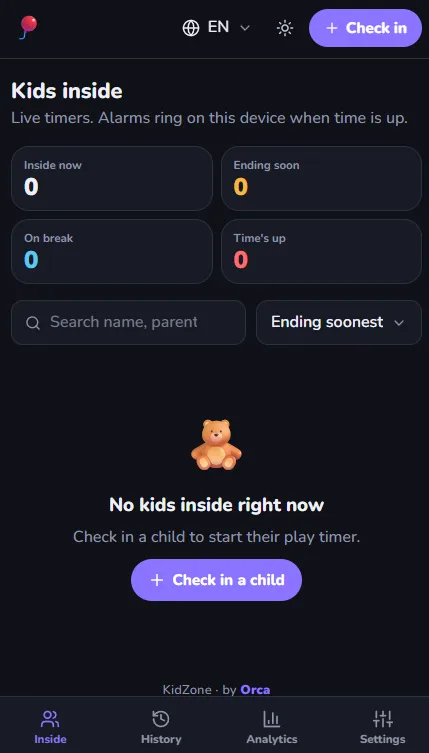
Check in one or more children for the same parent in one go (siblings): parent phone and name once, then a row per child (name, age, wristband tag, notes) — tap Add another child. Each child gets their own timer and card. Play time: slider, quick buttons (0:30 / 1:00 / 1:30 / 2:00 / 3:00), or Custom for any time from 5 minutes to 12 hours. School (optional) for each child. Search the built-in list of 475 Erbil schools (international, private, public; English, Kurdish and Arabic names) or type any other school. A school typed in is saved for every device, and you can remove typos in Settings → Schools. Brothers and sisters start with the first child's school. Returning families are recognized by phone number. The parent name fills in automatically and each child shows up as a one-tap chip; All adds the whole family. Checking out one child offers to check out their brothers and sisters too (ticked by default), with Undo. The phone field has a country picker. It defaults to 🇮🇶 Iraq +964, and you can switch to another country for a foreign parent. Local numbers like 0750 123 4567 become +964 750 123 4567. Typing a full +44… number also works. The default country can be changed in Settings. Kids inside: a live countdown for each child, with a progress bar and a status (Playing / Ending soon / Time's up). Each card has: WhatsApp: opens a chat with the parent and a pickup message already written. The button pulses once time is up. Call: makes a normal phone call. +30 min: adds time after a confirm that names the child and shows the new end time. If time already ran out, the 30 minutes count from now. Break / Resume: pauses the timer for a bathroom trip, a snack or a short trip out with a parent. While paused, the time left is frozen and no alarm rings. Resume continues with exactly the time that was left. Break time isn't counted as play time in History or Analytics. Check out: asks you to confirm, shows how long the child played and how late the pickup is, and lets you undo. Alarms: when a timer ends, this device plays a ringtone and vibrates, and a red banner names the child. It keeps ringing until you tap Silence. A soft chime plays a few minutes before the end (adjustable). Choose the ringtone in Settings: Chimes, Old phone, Digital beep, Twinkle Twinkle, or the Clean song 🫧). Tap ▶ to preview each one. Alarm volume (up to about 2.5× louder than before; the phone's media volume is the ceiling) and Vibrate (Android — iPhone doesn't allow web apps to vibrate) are in Settings too. You can also turn on desktop notifications and keep the screen awake. Languages: English, Arabic (العربية) and Kurdish Sorani (کوردی), switched with the 🌐 button in the top bar or on the login screen. Arabic and Kurdish switch the whole layout to right-to-left. Phone numbers, times and timers always read left-to-right. Staff can type digits on an Arabic or Kurdish keyboard (٠٧٥٠…) and they are understood. WhatsApp messages to parents follow the app language, or you can pick a fixed Message language in Settings. Search (Kids inside and History): name, parent, phone, wristband tag or school. It ignores spelling differences (أ/ا, ي/ی, ة/ه…), and phone numbers can be typed with or without the leading 0 or +964. Shows a "3 / 12" count; × or Esc clears it; on a keyboard, / jump to it. In History, Search the last 90 days finds a child without knowing the date. History: every visit for any day, with search. Export opens the same filtered export as Analytics, starting on the selected day. Tap a row to edit it or delete a mistake. Analytics → Export (also in History): download with filters: date range (up to 366 days), status (inside / checked out), pickup (late only / on time only), breaks, and a name/phone/tag search. It shows a live count of matching visits. Choose a PDF report (opens the print window; pick Save as PDF; A4 layout with totals, works in all 3 languages), Visits CSV (one row per visit) or Daily summary CSV (one row per day). The files open in Excel and Google Sheets with Arabic and Kurdish text intact. Analytics: visits, number of different kids and families, average stay, total play time, late-pickup rate, busiest hour and weekday. Charts show visits per day, check-ins by hour, visits by weekday and booked play time, plus the most frequent families. Schools shows which schools the kids come from; tap one, or use the school filter at the top, to see every number for that school only. Export uses the same school filter, and school is a column in the CSV and PDF. Light and dark themes (follows the system, or toggle it), a mobile tab bar (when a phone is turned sideways the menu moves into the top bar so the kids get the whole height), and offline support: changes are saved on the device and sync when the connection comes back.